Download fx-alert for MetaTrader 5
Price alerts on your own trend lines. Draw a line, set an alert, walk away.
Version 1.00 · 2026-10-24 · 380 KB
SHA-256: dac6c235d4668abee0f7945c38679f512536de159ddb33fd4e6fe21054987001
What it is
fx-alert is an Expert Advisor that watches the lines you draw on your charts and tells you when price reaches them. It works on horizontal lines and on trend lines, on any symbol, on any timeframe — including symbols you have no chart open for.
It never places, modifies or closes an order. It reads your charts and sends alerts. Nothing else.
It runs on any MetaTrader 5 terminal, with any broker, on a live or a demo account. No account, no sign-up, no settings to fill in.
Install
- Download the file. The button above saves fx-alert.ex5 to your Downloads folder.
- Put the file in your terminal's folder.
- Open your Downloads folder, right-click fx-alert.ex5 and choose Copy.
- In MetaTrader 5: File → Open Data Folder. A Windows folder opens — this is the folder belonging to this terminal.
- Open MQL5, then Experts, right-click in the empty space and choose Paste. Put it straight into Experts, not into a subfolder.
If you have MetaTrader installed for more than one broker, each one has its own separate folder, and the names on disk are not readable. Always use File → Open Data Folder from the terminal you want to use — that is what opens the right one. To use fx-alert in two terminals, repeat this step in each.
- Refresh the Navigator. In MetaTrader, right-click Expert Advisors in the Navigator panel and choose Refresh. fx-alert appears in the list. (Restarting MetaTrader 5 does the same thing.)
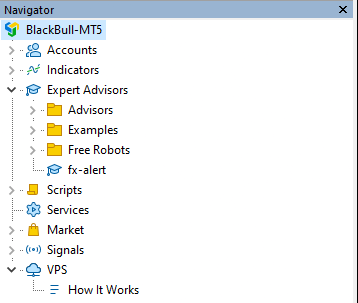
- Attach it to a chart. Open any chart — any symbol, any timeframe — and drag fx-alert onto it from the Navigator. Use a chart you are not using for anything else: MetaTrader allows only one Expert Advisor per chart.
A panel appears on that chart. Draw a trend line on any chart, select it, and press + Alert.
That is the whole setup. The three free alerts need nothing further.
The icon in the corner may be grey. That is Algo Trading being off, and it does not affect fx-alert — alerts are still watched and still delivered. fx-alert never trades, so it does not need algorithmic trading switched on.
Optional: Telegram and the 20-alert limit
Out of the box, fx-alert reaches you two ways: a popup on the terminal, and a push notification to the MetaTrader 5 app on your phone. Both are MetaTrader's own channels and neither goes through us.
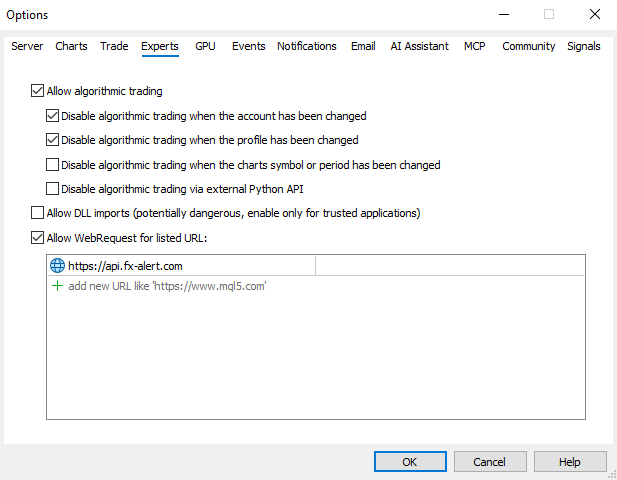
Two things do need our server: Telegram alerts, and the check that raises your limit to 20. Both use one address, and you only have to allow it once.
Tools → Options → Experts tab → tick "Allow WebRequest for listed URL", then add:
https://api.fx-alert.comDouble-click the empty row, type the address, and press Enter. If you press OK without pressing Enter first, the address is discarded without a warning.
Type it exactly as shown. www.api.fx-alert.com will not work.
Nothing else is sent to that address: no chart data, no prices, no orders, no personal details. Only your account number and server name, so we can check whether your limit is 3 or 20 — and the text of your own alerts, if you turn Telegram on.
Then open the Telegram tab in the fx-alert panel and follow the three lines there.
How many alerts
3 active alerts — everyone, on any broker, live or demo, forever. No trial, no expiry.
20 active alerts — if you have a live account with the broker we partner with. That broker does not accept clients in your country, so the higher limit is not available here. The three free alerts are, and always will be.
Alerts that have already fired do not use a slot.
What you need
- MetaTrader 5 on Windows
- The terminal running and connected. fx-alert watches your charts from inside MetaTrader, so alerts stop when the terminal is closed or the computer sleeps. If you need alerts around the clock, a VPS keeps the terminal running — MetaTrader offers one from inside the platform.
fx-alert sends alerts. It is not trading advice, and it does not trade for you.