How to Use fx-alert
fx-alert watches the lines you draw on the chart and notifies you when price does what you asked for. This page explains how alerts work, so the alert you set is the alert you actually mean. Please read it once before relying on an alert.
1. Quick start
- Pick a symbol from the symbol menu at the top left of the chart.
- Draw a line.
+ Lineplaces a horizontal line at the current price — drag it up or down to your level.+ Trendlets you draw a sloped line: press on the chart, drag, and release. A trend line always extends to the right, like a ray. - Open Set Alert. On a computer, right-click the line. On a phone or tablet, press and hold the line. Choose Set alert.
- Choose the condition, the timeframe and your notification channels, then save. The timeframe starts as the chart you are viewing — change it if you want the alert checked on another one. The line turns blue with a 🔔 and is locked in place, so it can't be moved by accident.
Orange lines are drafts without an alert. Blue lines have an active alert. Green dashed lines are alerts that have already fired.
You can keep 3 active alerts at a time. The counter at the top of the chart (for example 1/3) shows how many you are using — tap it to open your alert list. When an alert fires or expires, its slot frees up.
2. Notification channels
An alert is only as good as the notification that reaches you, so set up your channels before you need them. Open them with the 🔔 bell button at the top of the chart.
Telegram (recommended). Connect it once: our bot opens in Telegram, you press Start, and the channel is ready. Telegram is the most reliable channel on every device we have tested — phone, tablet and computer.
Web notifications (optional). Notifications from your browser. They must be enabled on each device separately — press Enable on this device in the browser you want to receive them in. How well they arrive depends on the device and its settings; phones in battery-saving mode may delay them. On iPhone and iPad, web notifications only work after adding the site to the Home Screen.
Test before you rely on it. The Set Alert window has a Test button. It sends a test message to every channel you have ticked. If the test doesn't arrive, check your device's notification settings — see the FAQ.
Using several devices? Sign in with Telegram on each device. Your alerts, lines and channels then follow you everywhere.
3. Two types of alert
Touch alert — "tell me when price reaches my line"
A touch alert watches every price tick and fires the moment price crosses your line. It uses the live prices only:
- Ask — the price you buy at
- Bid — the price you sell at
A touch alert fires once. If price keeps moving back and forth around the line, you will not get a stream of repeated messages.
If price is already on the alert side of the line when you create the alert, it waits for price to come back and cross the line again.
Example: Gold is trading at 4321.64. You have a support line at 4297.80 and plan to buy if price comes down to it. Alert: Ask ≤ Line.
Candle-close alert — "tell me when a candle closes the way I want"
A candle-close alert does nothing while the candle is forming. It checks your condition when the candle closes, and fires on the first closed candle that meets it. This filters out quick spikes through a level that reverse before the candle ends.
You can compare the line with:
- Open, High, Low, Close of the candle
- Open & Close — the candle's body: both the open and the close must meet the condition
A candle-close condition can have one side or two:
- One side:
Close > Line— the candle closed above the line. - Two sides:
High > Line > Close— the candle's high went above the line, but it closed back below it.
Operators: > ≥ < ≤. In a two-sided condition both operators point the same way.
Example: On H1 you have marked the last higher low of an uptrend. If a 15-minute candle closes with its whole body below that level, the uptrend may be turning. Alert on M15: Open & Close < Line.
4. The timeframe decides when the alert is checked
For candle-close alerts, the Timeframe in the Set Alert window decides which candles are checked — not which chart the line was drawn on. It starts as the chart you are viewing, and you can change it.
You can draw a line on the H4 chart and set the alert on M15: the alert then checks every 15-minute candle against that line. This is how most traders use it — find the level on a higher timeframe, get the alert on a lower one for an earlier, more precise entry.
For touch alerts the timeframe doesn't matter: every tick is checked.
Mind the 30-day lifetime (see section 6). On D1 an alert gets about 22 chances to fire in 30 days, on W1 about 4, and on MN at most one — it may expire before any candle closes.
5. Ask or Bid?
The Ask is always a little higher than the Bid — the difference is the spread. That is why the choice matters for touch alerts:
Up to the line
Fires first: Ask ≥ Line
Fires when your trade price gets there: Bid ≥ Line — if you plan to sell there
Down to the line
Fires first: Bid ≤ Line
Fires when your trade price gets there: Ask ≤ Line — if you plan to buy there
| Price moving toward your line | Fires first | Fires when your trade price gets there |
|---|---|---|
| Up to the line | Ask ≥ Line | Bid ≥ Line — if you plan to sell there |
| Down to the line | Bid ≤ Line | Ask ≤ Line — if you plan to buy there |
A simple rule:
- If you want the earliest possible warning, use Ask when price is rising toward the line and Bid when it is falling.
- If you want the alert when the price you would actually trade at reaches the line, use Bid for a sell and Ask for a buy.
On most major pairs the difference is small. On symbols with a wider spread — or during news and at the daily rollover, when spreads widen — it can be the difference between an alert and no alert.
6. What happens after an alert fires
- A notification is sent to the channels you selected.
- On the chart the line turns green and dashed, and a white arrow marks the candle that met the condition.
- The alert moves to the History tab of your alert list (open it with the slot counter, e.g.
1/3). Each entry shows the condition that was met, the exact time and whether each channel delivered it (✓ delivered, ✗ failed). - Use 👁 in History to show or hide a fired line on the chart. This applies on all your devices.
Times. The chart and History use UTC. Telegram shows its messages in your phone's local time.
How long things are kept.
- An active alert that doesn't fire within 30 days expires, and its slot is freed.
- Fired and expired alerts stay in History for 30 days, then they are deleted.
To change an alert, delete it and set a new one.
7. Our chart prices vs. your broker
The prices on fx-alert come from our own data feed. Every broker has its own feed and its own spread, so the price on your trading platform can differ slightly from ours, especially in fast markets.
Before setting an alert on a precise level, compare our price with your broker's. If there is a difference, move your line by that amount.
8. Examples
Each example shows one way a trader might turn a chart idea into an alert. The point is the alert — which condition fits which idea, and why. What the trader did after the alert is their own decision.
Touch alerts
Example 1 — Early warning at a Fibonacci level · Ask ≥ Line
USDJPY dropped hard on the H1 chart. The trader expects the fall to continue, but not before a pullback. He draws a Fibonacci retracement over the drop and places a horizontal line at the 50% level, planning to look for a short if price comes back up to it.
Alert: Ask ≥ Line
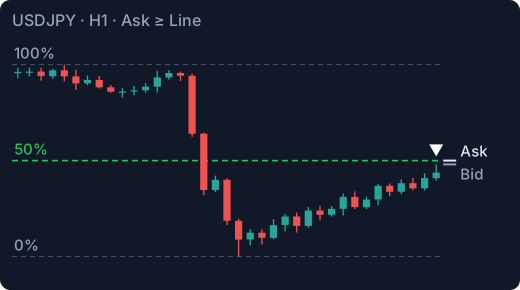
Why this condition: price is rising toward the line, and the Ask is above the Bid, so the Ask reaches the line first. This gives the earliest possible warning — time to open the chart and watch how price behaves at the level before deciding anything.
Example 2 — Sell price reaches a trend line · Bid ≥ Line
On M15, GBPUSD has turned down. Connecting the last two lower highs gives a descending trend line. The trader plans a quick scalp short if price pulls back to the line.
Alert: Bid ≥ Line on the trend line.
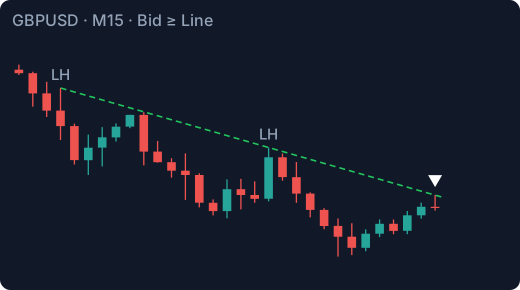
Why this condition: a short is opened at the Bid. With Bid ≥ Line the alert fires when the price he would actually sell at touches the line, not a spread earlier. A sloped line is fine: the alert follows the line's price at every moment.
Example 3 — "Come back to the screen" · Bid ≤ Line
A swing trader has marked an H4 demand zone on gold (XAUUSD) and would like to buy there — but she is at work and can't watch the chart. She puts a horizontal line on the top edge of the zone.
Alert: Bid ≤ Line
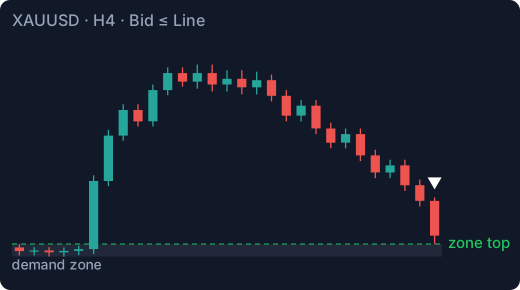
Why this condition: price is falling toward the line, so the Bid gets there first. The alert is not an entry signal; it tells her the zone is in play, so she can check the lower timeframes for her entry.
Example 4 — Managing an open trade · Ask ≤ Line
Alerts are not only for entries. The trader is already short EURUSD. His plan: when the trade is in profit by the same distance as his stop (1R), he moves the stop to breakeven. He draws a line at 1R below his entry.
Alert: Ask ≤ Line
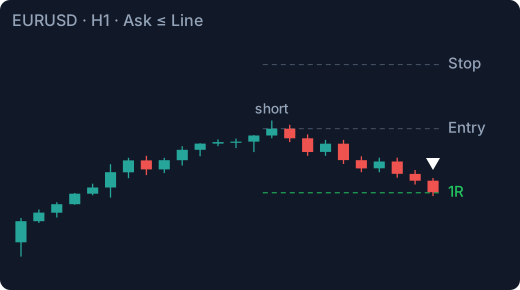
Why this condition: a short position is closed at the Ask, so his profit is measured in Ask. The alert fires when the Ask reaches 1R — the moment his own plan says to act.
Candle-close alerts — breakouts
Example 5 — First close below a trend line · Close < Line
AUDUSD has been rising along an H1 trend line, but the last pushes up are getting weaker. The trader wants to know as early as possible if the trend line breaks.
Alert: on M15, Close < Line
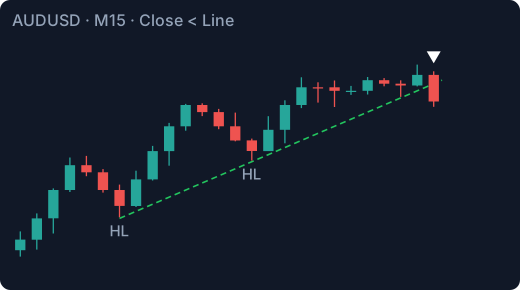
Why this condition: it fires on the first 15-minute candle that closes below the line — the earliest confirmed break. The trade-off: an early signal also catches more false breaks that return above the line. Example 6 shows the stricter version.
Example 6 — Price settles below a broken level · Open & Close < Line
On EURUSD H1 the trader marks the last higher low of the uptrend. A break below it would suggest the trend is turning, but she wants proof that price is accepted below the level, not just a quick poke.
Alert: on M15, Open & Close < Line
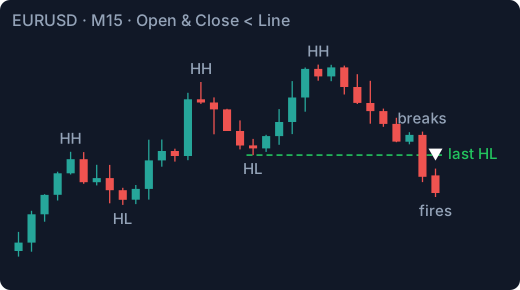
Why this condition: the candle that breaks a level usually opens above it and closes below it — so it does not meet this condition. The alert fires on the first candle whose whole body is below the line, which normally means price has started to settle there. Fewer false signals than Example 5, at the cost of a slightly later alert.
Example 7 — Pullback ends, trend resumes · Close > Line
Gold is in an uptrend on H1. On M15 the trader sees a pullback and draws a trend line across its lower highs. A break above that line could mean the uptrend is resuming.
Alert: on M5, Close > Line
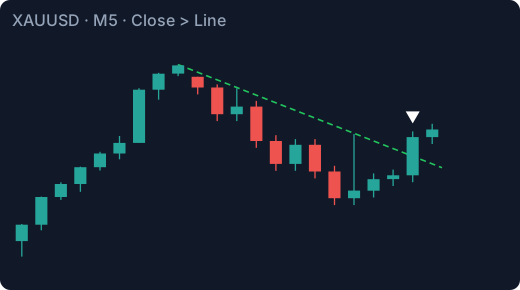
Why this condition: checking M5 instead of M15 gives an earlier alert, which usually means a tighter possible stop. The line was drawn on M15, but the alert checks M5 candles — the timeframe decides when the alert is checked.
Example 8 — One strong candle through the level · Open < Line < Close
GBPUSD has been in a range all morning. Before a news release, the trader draws a line at the top of the range. He is only interested if price breaks out with force — not if it slowly creeps above.
Alert: on M15, Open < Line < Close
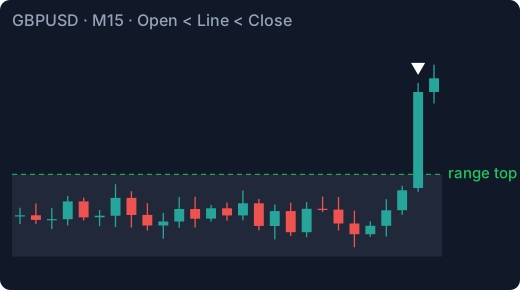
Why this condition: the candle must open below the line and close above it — one candle crossing the whole level. A slow drift across the line over several candles doesn't fire, because no single candle both opens below and closes above.
Example 9 — Breakout without a retest · Low > Line
BTCUSD has broken above an important H4 resistance. The trader waits for a retest to buy, with the line as his level. But if price runs away without looking back, he wants to know, so he can stop waiting.
Alert: on H4, Low > Line
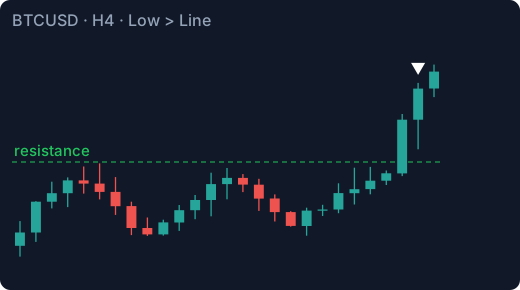
Why this condition: the whole candle, wick included, must stay above the line. It fires on the first H4 candle that trades completely above the level — a sign that buyers didn't let price back to it.
Example 10 — Two alerts, two outcomes · Close > Line and Close < Line
USDJPY has just turned up on H1. On M15 the trader sees a bull flag and draws trend lines along its top and bottom. He is not sure the new uptrend will hold, so he sets two alerts: a close above the top line means the flag has broken up; a close below the bottom line means the idea is off.
Alerts: on M15, Close > Line on the top line and Close < Line on the bottom line.
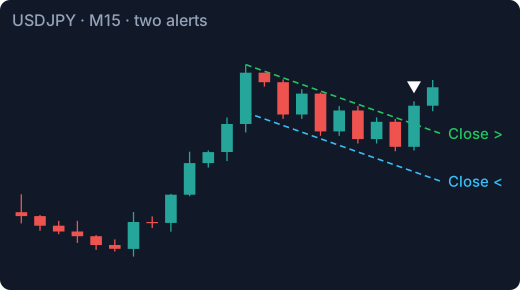
Why these conditions: two alerts cover both outcomes, and whichever fires first tells him which way price went. Remember to delete the other alert afterwards to free its slot.
Candle-close alerts — sweeps and rejections
Example 11 — Liquidity grab above a high · High > Line > Close
Gold reaches an H4 order block. On H1 the trader draws a line at the last higher high, where buy stops are likely resting. His idea: if price runs those stops and then falls back below the high, the move up may be exhausted.
Alert: on M15, High > Line > Close
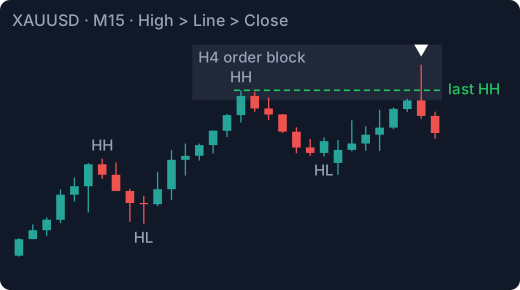
Why this condition: the candle's high must go above the line (the stops are taken) and the candle must close back below it (the move failed). Price just touching the level is not enough — the close decides.
Example 12 — Asian low swept at the London open · Low < Line < Close
The session bands on the chart show the Asian range on EURUSD. The trader draws a line at the Asian session low. A common pattern: London opens, price dips below the Asian low, sell stops are triggered, and price turns back up.
Alert: on M15, Low < Line < Close
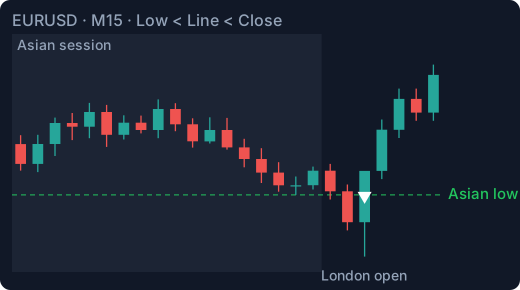
Why this condition: this is Example 11 upside down. The wick goes below the line, the candle closes back above it. It fires only when the sweep is rejected, not when price simply keeps falling.
Example 13 — Rejection at yesterday's high · Open & Close < Line < High
USDJPY is approaching the previous day's high. The trader expects sellers there, and wants to see price test the level and fail.
Alert: on H1, Open & Close < Line < High
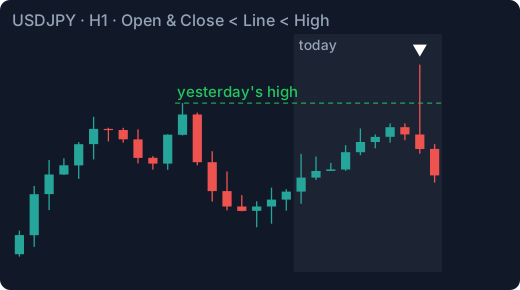
Why this condition: the high reaches above the line, but the whole body — open and close — stays below it: price came from below, tested the level and was pushed back. Compare with Example 11: High > Line > Close also fires on a candle that opened above the line and fell through it. Requiring the open below the line keeps only true rejections.
Example 14 — Old resistance becomes support · Open & Close > Line > Low
GBPUSD broke above a resistance level on H1. The trader wants to buy if the level now holds as support: price dips back into it and buyers defend it.
Alert: on H1, Open & Close > Line > Low
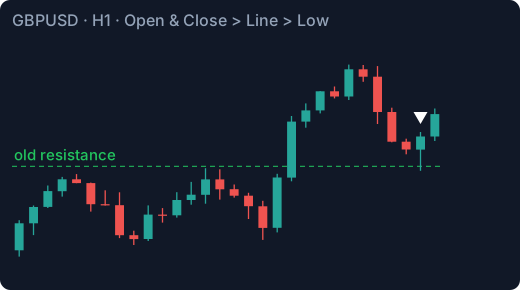
Why this condition: the wick touches the line (the retest), while the whole body stays above it (the level held). This is the classic break-and-retest in one condition.
9. More questions?
See the FAQ — setting up notifications on each device, Telegram on a computer, iPhone, and more.
The examples on this page show how the alert tool works. They are not trading advice or trading signals. Trading forex and CFDs carries a high risk of losing money.